




- Email[email protected]
- Phone+962 797 166 177
- Birthday1982-09-25
- LocationAmman, Jordan
Zero-Click Deploys: Automating GitHub-to-Server Pushes on Hetzner with CloudPanel & dploy
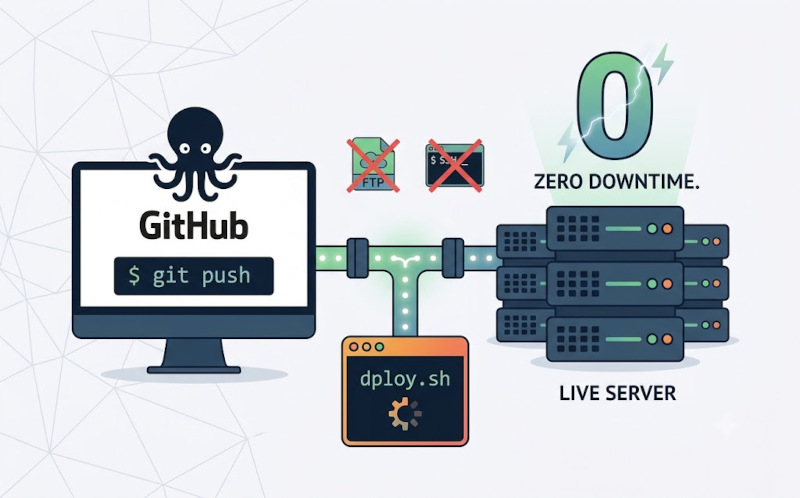
G'day mates! Welcome back. Back when we ditched shared hosting for a Hetzner CX23 box running CloudPanel, I mentioned in passing that I use a little tool called dploy to push code straight from GitHub onto the live server. A few of you asked for the full walkthrough, so today we're finishing what we started.
If you're still SSH-ing in to run a manual git pull, or dragging files over FTP every time you ship a fix, you already know how that turns into a midnight outage from a half-uploaded file. We're going to fix that properly: a pipeline that goes from git push to a live, zero-downtime deploy in seconds, with no hands on the keyboard once it's wired up. Let's crack into the terminal and get this sorted!
Why Manual Deploys Are a Dead End
Dragging files over FTP or eyeballing a git pull feels fine right up until it isn't. You forget to run composer install after adding a dependency, you overwrite a config file that only exists on the server, or you upload half a directory before the connection drops and the site sits broken until you notice. None of that is a technology problem, it's a process problem. The fix is to make the deploy pipeline the only path code is ever allowed to take to production, so the fragile, forgetful human step disappears entirely.
Step 1: Lock Down Repo Access for the Server
First, make sure the box can pull your repository without your personal GitHub credentials ever touching it. In CloudPanel, confirm the site is created (Sites -> Add Site) and note its Linux user and htdocs path, something like /home/app-user/htdocs/app.yazan.me. SSH in as that user and generate a dedicated key pair just for deployments.
Bash
ssh-keygen -t ed25519 -C "deploy@server" -f ~/.ssh/deploy_key -N ""
cat ~/.ssh/deploy_key.pub
Paste that public key into the repository's Settings -> Deploy keys as a read-only key. Read-only matters: if that key ever leaks, the worst it can do is clone your code, not push to it.
Step 2: Drop dploy.sh Onto the Box
dploy is deliberately boring. It's a small bash script that does exactly three things when triggered: pull the latest commit on main into a fresh, timestamped release folder, run the project's build steps, then atomically swap a symlink so the live site never serves a half-finished deploy.
Bash
mkdir -p ~/releases ~/dploy
nano ~/dploy/dploy.sh
The script itself looks roughly like this:
Bash
#!/usr/bin/env bash
set -euo pipefail
RELEASE=~/releases/$(date +%Y%m%d%H%M%S)
git clone --depth 1 --branch main [email protected]:you/repo.git "$RELEASE"
cd "$RELEASE"
composer install --no-dev --optimize-autoloader
npm ci && npm run build
ln -sfn "$RELEASE" ~/htdocs/app.yazan.me/current
sudo systemctl reload php8.3-fpm
ls -dt ~/releases/*/ | tail -n +6 | xargs -r rm -rf
That last line is the safety net: it keeps the five most recent releases on disk so a bad deploy is one symlink flip away from a rollback, and prunes anything older so the disk doesn't fill up.
Step 3: Expose a Tiny, Locked-Down Webhook Listener
Next we need something GitHub can actually call. Rather than opening SSH to the internet, we expose one small, secret PHP endpoint that verifies the request really came from GitHub before it triggers the script.
Bash
nano ~/htdocs/app.yazan.me/deploy/hook.php
The listener checks GitHub's HMAC signature against a shared secret, confirms the push landed on main, then kicks off dploy.sh in the background and returns immediately so GitHub doesn't time out waiting on the build:
Bash
<?php
$secret = getenv('DEPLOY_WEBHOOK_SECRET');
$payload = file_get_contents('php://input');
$sig = 'sha256=' . hash_hmac('sha256', $payload, $secret);
if (!hash_equals($sig, $_SERVER['HTTP_X_HUB_SIGNATURE_256'] ?? '')) {
http_response_code(401);
exit('bad signature');
}
$data = json_decode($payload, true);
if (($data['ref'] ?? '') !== 'refs/heads/main') {
http_response_code(200);
exit('ignored, not main');
}
exec('nohup ' . escapeshellarg(getenv('HOME') . '/dploy/dploy.sh') . ' > /tmp/dploy.log 2>&1 &');
http_response_code(202);
echo 'deploy queued';
Set DEPLOY_WEBHOOK_SECRET as an environment variable on the site in CloudPanel rather than hardcoding it, and make sure the deploy folder sits outside anything git-ignored so a stray push can't overwrite the listener itself.
Step 4: Wire Up the GitHub Webhook
With the listener live, head to your repository's Settings -> Webhooks -> Add webhook. Set the Payload URL to https://app.yazan.me/deploy/hook.php, the content type to application/json, and the secret to the exact value you set as DEPLOY_WEBHOOK_SECRET on the server. Under 'Which events would you like to trigger this webhook?', choose 'Just the push event' and make sure the webhook is marked Active.
Push a commit to main and watch it land. Tail the log on the server and you'll see the new release get cloned, built, and symlinked in, usually before you've even switched back to your browser to refresh the site.
Bash
tail -f /tmp/dploy.log
And that's a wrap! You've closed the loop from the original Hetzner setup: code now travels from your laptop to a live, zero-downtime deploy on your own server with nothing but a git push in between, no FTP, no manual SSH sessions, and no more forgetting to run composer install at 11pm. Let me know in the comments if you're running something similar, or if you've got a favourite lightweight deploy script of your own. Cheers!
"If you've got any questions or need a hand wrangling your own setup, don't hesitate to reach out at [email protected] or connect with me via www.yazan.me. I'm always keen to help out!"