




- Email[email protected]
- Phone+962 797 166 177
- Birthday1982-09-25
- LocationAmman, Jordan
The Second Life of Old Phones: Turning Retired Androids into Home Assistant Wall Dashboards
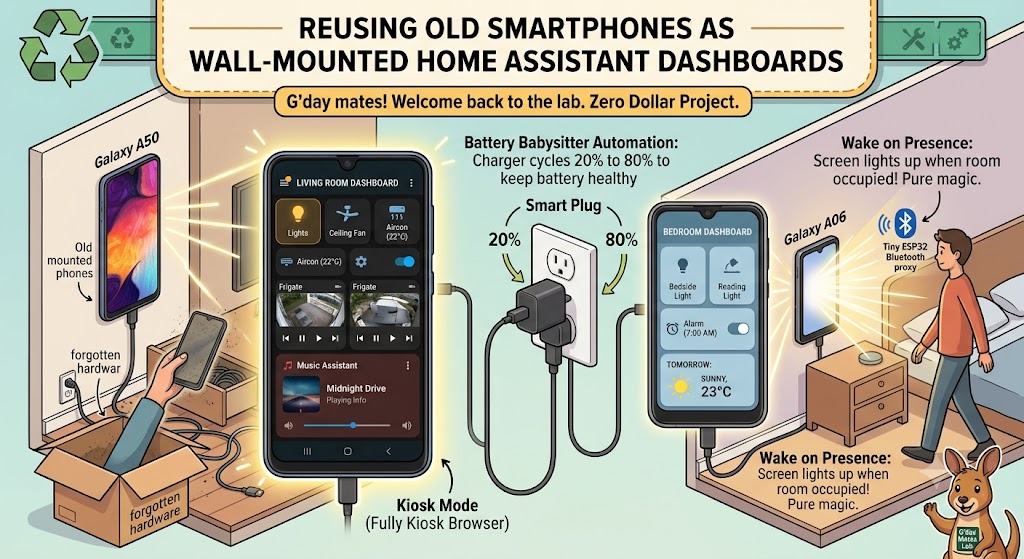
G'day mates! Welcome back to the lab. Today's project costs exactly zero dollars, and there's a decent chance you already own all the hardware — it's just sitting in a drawer, forgotten, next to some tangled cables and a manual for a TV you no longer own.
I'm talking about old smartphones. In our house, a retired Samsung Galaxy A06 and an old Galaxy A50 have been given a glorious second life: mounted on the wall as always-on Home Assistant dashboards, one in the living room and one in the bedroom.
Every light, sensor, camera feed, and music player in the house, one glance away. Let's crack into it!
Why Old Phones Beat Fancy Tablets
You could drop a few hundred dollars on a purpose-built wall tablet. Or you could grab a phone that's already paid for, already has a gorgeous touchscreen, Wi-Fi, a light sensor, and a battery that acts as a built-in UPS when the power blips.
Old phones are honestly better suited to this job than they ever were as daily drivers. A five-year-old Android that chokes on modern apps will render a Home Assistant dashboard without breaking a sweat.
Step 1: Strip It Down
First, give the phone the minimalist treatment. Factory reset it, skip every account sign-in you can, and uninstall or disable everything except the essentials. No SIM, no notifications, no distractions — this thing has one job.
Then install the Home Assistant Companion app, point it at your server, and log in. Since our Home Assistant runs behind a Cloudflare Tunnel, the phones connect from the IoT Wi-Fi without any port forwarding shenanigans.
Step 2: Build a Dashboard Worth Staring At
A wall panel needs a different dashboard to the one on your pocket phone. Big touch targets, high contrast, and only what matters for that room.
For the living room panel, that means lights, the media player from our Music Assistant setup, the aircon, and a glanceable strip of camera feeds from Frigate. The bedroom one is simpler again: lights, alarm, and tomorrow's weather.
Create a dedicated Home Assistant user for each panel, and assign the dashboard to that user. That way the phones only ever see what they need — a nice little security bonus.
Step 3: Kiosk Mode
Out of the box, the phone will still show its status bar and navigation buttons, and the screen will time out. Fully Kiosk Browser fixes all of it: true fullscreen, screen always-on control, motion detection via the front camera, and remote configuration.
Pin it as the device's launcher, and the phone boots straight into your dashboard and never leaves it. The free version does everything a home lab needs.
Step 4: The Battery Babysitter
Here's the bit most guides skip: leaving a phone plugged in at 100% around the clock is a recipe for a swollen battery. The fix is delightfully smart-home: put the charger on a smart plug and let Home Assistant babysit the battery.
The Companion app already reports the battery level as a sensor, so the automation is a two-liner: charger on below 20%, charger off above 80%.
YAML
alias: LR Dashboard Battery Babysitter
triggers:
- trigger: numeric_state
entity_id: sensor.lr_a06_battery_level
above: 80
actions:
- action: switch.turn_off
target:
entity_id: switch.lr_dashboard_charger
Mirror it with a second automation that switches the charger back on below 20%, and the battery spends its life cycling gently in the healthy zone.
Bonus: Wake on Presence
This is where the lab's room-presence setup pays off again. Our ESP32 Bluetooth proxies and Bermuda already know which room you're in — so why should the dashboard be awake when nobody's there?
Fully Kiosk exposes screen on/off controls to Home Assistant, so one small automation turns the panel on when the room becomes occupied and blanks it after ten minutes empty. The screen lights up as you walk in like it was waiting for you. Pure magic.
The Verdict
A wall-mounted smart home panel in every room sounds like a luxury build, but it's genuinely one of the cheapest projects in the entire lab. Old phone, dab of 3M tape, smart plug, one afternoon of dashboard fiddling — done.
Raid that drawer, mate. Those old phones have one more job left in them. Cheers!
"If you've got any questions or need a hand wrangling your own setup, don't hesitate to reach out at [email protected] or connect with me via www.yazan.me. I'm always keen to help out!"