




- Email[email protected]
- Phone+962 797 166 177
- Birthday1982-09-25
- LocationAmman, Jordan
The Recycled Home Lab: Turning a Retired Laptop into a High-Performance Ubuntu Server
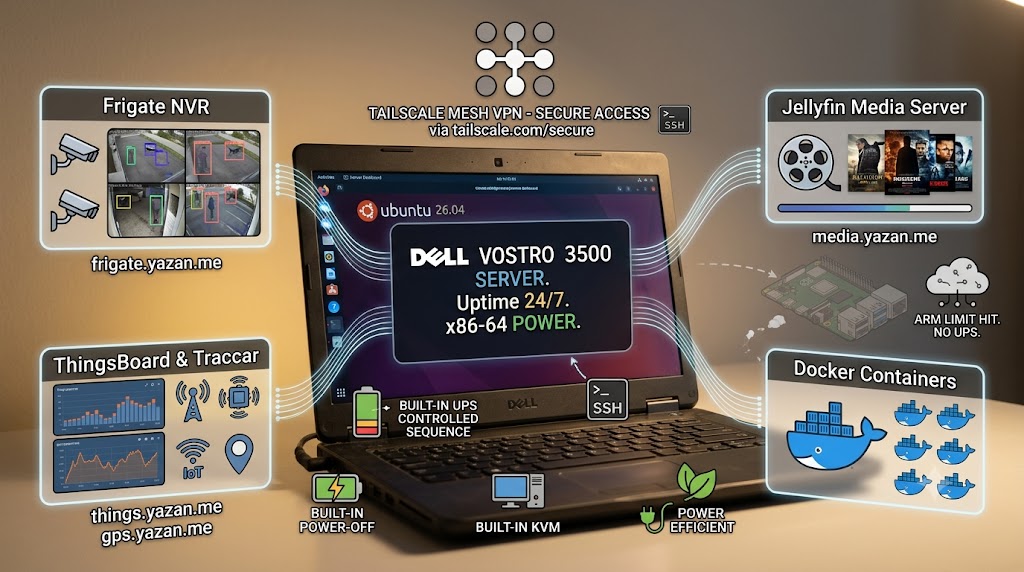
When building a home lab, the default advice is almost always: "Buy a Raspberry Pi." And for good reason—they are fantastic, low-power devices. In fact, much of my own smart home, from Home Assistant to my MQTT broker, runs on various Pi models. But as your lab grows, you eventually hit a wall. When you start running heavy-duty applications like Frigate NVR, Jellyfin media streaming, or ThingsBoard for IoT telemetry, an ARM SBC starts showing its limits.
That's when I realized the perfect home lab server wasn't a rack-mounted beast or another Pi—it was a retired Dell Vostro laptop sitting in my drawer. In this post, I’ll walk you through how I repurposed an old Dell Vostro 3500 into the powerhouse of my network, running Ubuntu 26.04 LTS and serving as the backbone for my most demanding Docker containers.
Why a Laptop is the Ultimate Budget Server
Using an old laptop as a server might sound like a hack, but it actually offers several massive advantages over traditional desktop or SBC server builds:
-
The Built-in UPS: Power outages are the enemy of data integrity. A laptop has a built-in battery, effectively acting as an uninterruptible power supply (UPS). If the house loses power, the server stays up long enough to shut down gracefully—or ride out the outage.
-
Built-in KVM: Whenever a headless server loses network connection, dragging out a monitor and keyboard is a chore. A laptop has the screen and keyboard built right in for instant troubleshooting.
-
Power Efficiency: Laptops are engineered to sip power to maximize battery life, making them incredibly cheap to run 24/7 compared to desktop hardware.
-
Silent Operation: Unlike noisy rack servers, laptops are designed to be relatively quiet, which is perfect for a home environment.
The Hardware Specs
My chosen machine is a Dell Vostro 3500. While it’s technically "retired" from daily driving duties, its specs are nothing to scoff at:
-
Processor: 13th Gen Intel Core i7-13620H
-
RAM: 8GB
-
Storage: 512GB SSD
-
OS: Ubuntu 26.04 LTS (x86-64)
With this hardware, I have plenty of compute overhead for transcoders, database queries, and object detection.
Setting Up the Software Stack
I wiped Windows and installed a fresh copy of Ubuntu 26.04 LTS. Because I prefer a proudly Microsoft-free environment at home, going with a pure Linux server was a no-brainer.
To securely access the server without opening any router ports, I heavily rely on Tailscale. The machine is accessible via Tailscale SSH at ssh.server.yazan.me. Tailscale's magic mesh VPN means I can securely log into this machine from my work Pi or personal devices, no matter where I am, without exposing SSH to the public internet or managing a mess of keys.
The Heavy Hitters: Services Running on the Dell
This laptop doesn't just sit idle; it runs the heavy hitters of my self-hosted ecosystem via Docker. Here’s what it powers:
1. Frigate NVR: Processing camera feeds and running object detection takes serious compute. While I plan to add a Google Coral TPU soon, the i7 processor handles the heavy lifting effortlessly for now, securely exposed via a Cloudflare Tunnel at frigate.yazan.me.
2. Jellyfin Media Server: Serving up my personal "Netflix." Transcoding media on the fly is resource-intensive, but the Intel processor breezes through it. It's accessible securely at media.yazan.me.
3. ThingsBoard & Traccar: My massive IoT telemetry visualizer (ThingsBoard) and GPS fleet tracking (Traccar, tracking my SIM7600 DIY trackers) both require robust databases and responsive frontends. They live comfortably here at things.yazan.me and gps.yazan.me.
4. LAMP Stack: For hosting local development projects and internal tools, a classic LAMP stack runs smoothly alongside the Docker containers.
Conclusion
If you are looking to step up from a Raspberry Pi but don't want to invest hundreds of dollars into a NUC or a noisy enterprise server, look in your closet. An old laptop is arguably the best secret weapon in the home lab community. It’s powerful, power-efficient, and comes with its own UPS and console.
"If you've got any questions or need a hand wrangling your own setup, don't hesitate to reach out at [email protected] or connect with me via www.yazan.me. I'm always keen to help out!"