




- Email[email protected]
- Phone+962 797 166 177
- Birthday1982-09-25
- LocationAmman, Jordan
The Cloud Brain Deploying a Custom Qwen3-32B Model via Hugging Face ZeroGPU
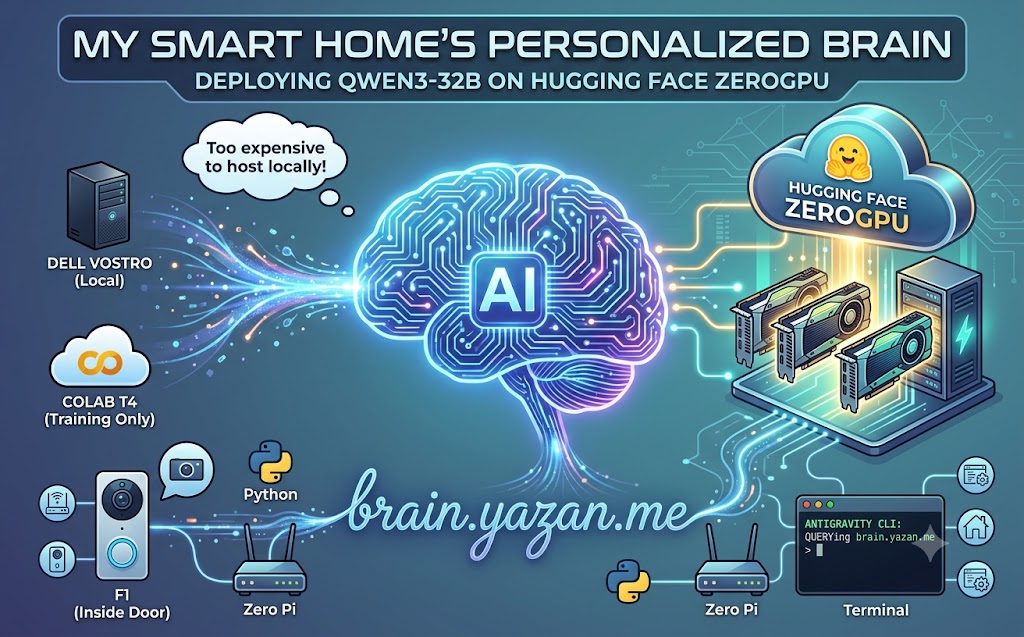
Over the last few weeks, I’ve been heavily experimenting with local language models. From my first attempts at abliteration to fine-tuning a tiny model via LoRA to sound like me, the goal has always been the same: building a personalized AI "brain" for my infrastructure.
But there was a problem. Running a massive 32-billion parameter model like Qwen3-32B requires serious GPU horsepower. While my Colab T4 GPU notebooks were great for training and tinkering, keeping a local machine running 24/7 with enough VRAM to host the model for real-time inference just wasn't practical (or budget-friendly) for a home lab.
Enter Hugging Face's ZeroGPU. In this post, I’ll walk you through how I took my customized Qwen3-32B model and deployed it to the cloud, giving my smart home a persistent, highly intelligent brain.
The Challenge of Hosting Large Models
When dealing with a 32B model, you need a substantial amount of memory. Even quantized, you are looking at significant hardware requirements. My Dell Vostro server (with its i7 and 8GB of RAM) is a beast for Docker containers, but it would melt trying to run real-time inference on this model.
I needed a solution that was available 24/7, didn't burn a hole in my electricity bill, and could handle bursts of compute when my Antigravity CLI or smart home scripts queried it. Hugging Face Spaces with ZeroGPU offers a unique serverless-like GPU environment that spins up compute exactly when you need it.
Deploying to ZeroGPU
ZeroGPU essentially provides shared GPU resources for Hugging Face Spaces. It allows developers to host demanding AI applications without paying for a dedicated, constantly-running A100.
After finalizing my fine-tuning on Colab, I pushed the weights to a private Hugging Face repository. Setting up the Space involved creating an app.py script utilizing Gradio and the transformers library to serve the model. The key to making it work efficiently on ZeroGPU was ensuring the model loads correctly within the dynamic GPU allocation constraints.
Giving It a Home: brain.yazan.me
Of course, accessing an ugly Hugging Face URL wasn't going to cut it for a proper home lab setup. I mapped my custom domain, brain.yazan.me, to the Space.
Now, instead of relying on external, closed-source APIs like OpenAI, my infrastructure queries my own abliterated, fine-tuned Qwen3-32B model. Whether it's my Antigravity CLI automating my workflow, or python scripts summarizing events around the house, they all talk to brain.yazan.me.
The Impact on the Home Lab
Having a dedicated, custom-tailored LLM changes the dynamic of home automation:
-
Privacy First: My data isn't being used to train corporate models.
-
Tailored Responses: Because of the LoRA fine-tuning, the model understands the specific context of my network—knowing that "F1" means the inside front door, and "Zero Pi" refers to my subnet router.
-
Cost-Effective: By utilizing ZeroGPU, I get the power of a massive model without the massive cloud compute bills.
Conclusion
We are entering an era where you don't just self-host your media or your smart home controller—you self-host your intelligence. Deploying Qwen3-32B to ZeroGPU was the missing puzzle piece that finally brought my personalized AI out of the notebook and into production.
"If you've got any questions or need a hand wrangling your own setup, don't hesitate to reach out at [email protected] or connect with me via www.yazan.me. I'm always keen to help out!"