




- Email[email protected]
- Phone+962 797 166 177
- Birthday1982-09-25
- LocationAmman, Jordan
Remote Control Everything: Managing Every Android in the House with Scrcpy over Tailscale
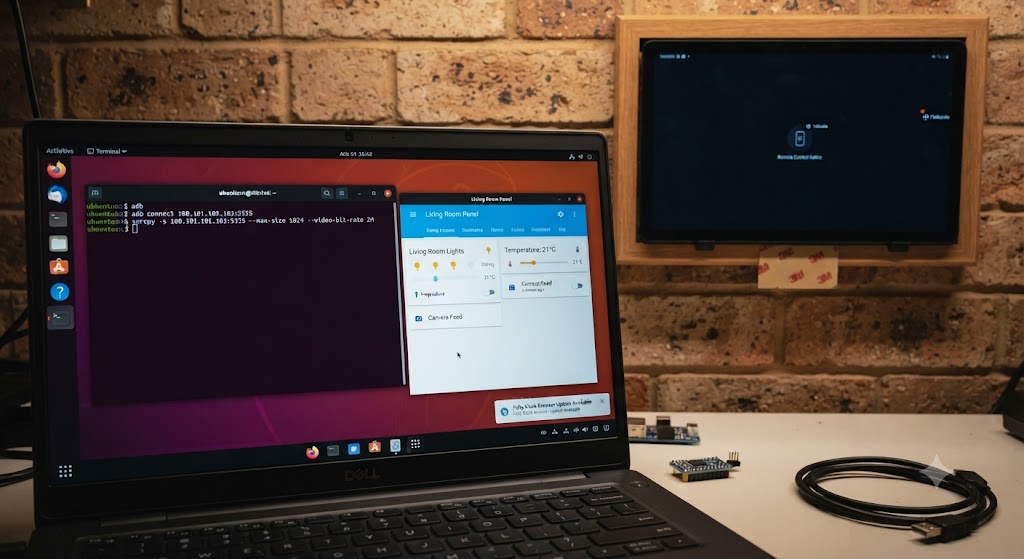
G'day mates! Welcome back to the lab. Last time we gave a couple of retired Samsung Galaxys a glorious second life as wall-mounted Home Assistant dashboards. Lovely stuff — right up until Fully Kiosk needs an update, or the Companion app wants a re-login, and you realise the phone is stuck to the wall with 3M tape and its whole personality is 'don't touch me'.
Peeling a phone off the wall to poke at settings is a rookie move. The lab way is to control every Android in the house — the living room panel, the bedroom panel, even my daily-driver S25 Ultra — from the laptop, from anywhere on Earth. Two free tools make it happen: scrcpy and our old mate Tailscale. Let's crack into it!
Why Scrcpy?
Scrcpy (pronounced 'screen copy', developed by the Genymobile folks) mirrors an Android's screen to your computer and hands you full control — mouse becomes touch, keyboard types, clipboard syncs both ways. It's free, open source, needs no account, no cloud relay, and installs nothing on the phone. It talks plain ADB, which every Android already speaks.
It's also delightfully light. On the Ubuntu laptop it's a single package, and it happily drives a phone at full frame rate over Wi-Fi. TeamViewer and its subscription-hungry cousins can stay home — this lab remains proudly free of that sort of thing.
Step 1: Cut the Cable with Wireless ADB
Scrcpy normally rides a USB cable, which is no good for a phone glued to the wall. The fix is ADB over Wi-Fi. Plug the phone in once (yes, one last peel off the wall — the final one, promise), enable Developer Options and USB debugging, then tell ADB to listen on the network:
Bash
adb tcpip 5555
Unplug, and from now on the connection is wireless:
Bash
adb connect 192.168.3.50:5555
scrcpy -s 192.168.3.50:5555
And there it is — the wall panel, live on the laptop screen, fully controllable. On the LAN this alone is a game changer for dashboard maintenance.
Step 2: The Tailscale Trick
A LAN IP only helps while you're on the LAN. But both wall panels and the S25 Ultra already run the Tailscale app as part of our mesh VPN setup — which means each phone has a Tailscale IP that works from absolutely anywhere.
Swap the LAN address for the tailnet one and the magic happens:
Bash
adb connect 100.101.102.103:5555
scrcpy -s 100.101.102.103:5555 --max-size 1024 --video-bit-rate 2M
The size and bitrate flags keep things silky over a mobile connection — full resolution is lovely on the LAN but wasteful from a cafe. I've updated Fully Kiosk on the living room panel from the office, sitting behind the same Tailscale connection our subnet router post set up years of posts ago. The phone never knew I wasn't home.
The Maintenance Playbook
With the pipe in place, everything the wall panels ever need happens remotely. A few favourites from the toolkit:
Updating apps: open the Play Store on the mirrored screen and tap away, exactly as if the phone were in your hand. Restarting the Companion app after a Home Assistant upgrade takes ten seconds.
File transfer: adb push and adb pull shove files to and from the phones over the same connection — handy for sideloading a Fully Kiosk APK or grabbing a screenshot of a dashboard for, say, a blog post.
Screen off while you work: the -S flag turns the phone's physical screen off while you control it. The bedroom panel gets its maintenance without lighting up the room at midnight — the automation gods approve.
And the daily driver: scrcpy isn't just for the wall fleet. Mirroring the S25 Ultra onto the Ubuntu desktop means replying to messages with a real keyboard and dragging files off the phone without hunting for a cable.
A Word on Security
ADB with network access is root-adjacent power — on an open network, leaving port 5555 exposed would be an absolute shocker. This is exactly why the Tailscale layer matters: the ADB port is only reachable inside the tailnet, encrypted end to end, visible to my devices and nobody else's. The IoT Wi-Fi the panels live on can stay as locked down as ever.
Belt-and-braces tip: ADB over TCP doesn't survive a reboot, so a rebooted panel quietly returns to USB-only mode until you re-enable it. Slightly annoying, weirdly reassuring.
The Verdict
The wall dashboard project was already one of the cheapest wins in the lab, and this closes its one real gap: maintenance. Two free tools, zero subscriptions, zero new hardware, and every Android in the house is now a first-class, remotely manageable citizen of the lab — from the couch or from another country.
The 3M tape never gets disturbed again. Cheers!
"If you've got any questions or need a hand wrangling your own setup, don't hesitate to reach out at [email protected] or connect with me via www.yazan.me. I'm always keen to help out!"