




- Email[email protected]
- Phone+962 797 166 177
- Birthday1982-09-25
- LocationAmman, Jordan
Pump Up the Volume: Multi-Room Audio with Music Assistant on the Raspberry Pi 4
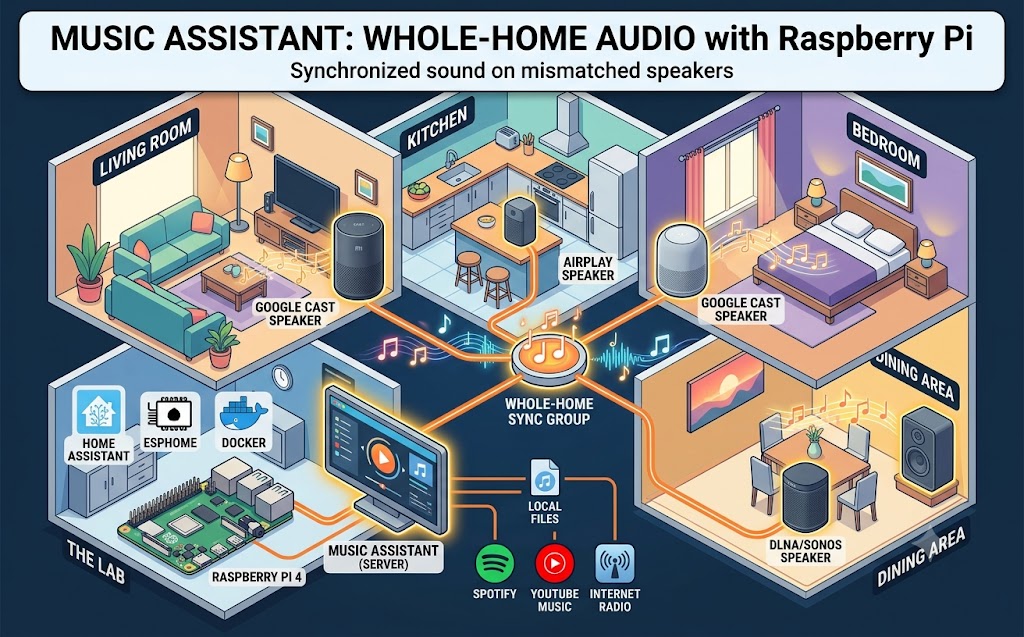
G'day mates! Welcome back to the lab. If you've been following along, you know our trusty Raspberry Pi 4 is already doing some serious heavy lifting — running Home Assistant and ESPHome side by side in Docker containers without breaking a sweat.
But there's been one glaring gap in the setup: music. We've got speakers scattered across every room — the living room, the bedroom, the kitchen, even the dinner table area — and until now, they've all been living separate lives.
Today, we're fixing that with Music Assistant: a free, open-source music server that turns a pile of mismatched smart speakers into one glorious, whole-home sound system. Let's crack into it!
What the Heck is Music Assistant?
Think of Music Assistant as the missing link between your music and your speakers. It's a standalone server that connects your music sources on one side — local files, radio streams, and streaming providers like Spotify or YouTube Music — and your players on the other.
The real magic is that it doesn't care whose logo is on the speaker.
Google Cast, AirPlay, DLNA, Sonos, Squeezebox — Music Assistant speaks all of them fluently. And because it integrates natively with Home Assistant, every speaker it manages becomes a fully controllable media player entity in your smart home.
Best of all? It runs happily alongside Home Assistant on the same Raspberry Pi 4. No extra hardware needed.
Spinning It Up in Docker
Step 1: Add the Container. Since we're already running our whole stack in Docker, adding Music Assistant is a two-minute job. It needs host networking so it can discover the speakers on your LAN — here's the compose config:
YAML
services:
music-assistant:
container_name: music-assistant
image: ghcr.io/music-assistant/server:latest
restart: unless-stopped
network_mode: host
volumes:
- /path/to/your/data:/data
Step 2: Launch It. Fire it up with the usual one-liner:
Bash
docker compose up -d
Step 3: Open the Web Interface. Open your browser and head to your Pi's IP on port 8095. In my case, I've also stuck it behind a Cloudflare Tunnel — the same trick we used for Home Assistant and Frigate — so the interface is reachable securely from anywhere without opening a single port.
Rounding Up the Speakers
This is where Music Assistant genuinely blew me away. Head to Settings, add the Google Cast player provider, and watch it sniff out every Cast-capable speaker on your network automatically.
All those Xiaomi Google Assistant speakers we've got handling voice control in every room? They popped up instantly — living room, bedroom, kitchen, the lot. No IP addresses, no manual config, no mucking about.
Now add your music providers the same way. Local files, internet radio, Spotify, YouTube Music — pick your poison. Music Assistant pulls everything into one unified library.
Sync Groups: Here's the killer feature. Select a few speakers and group them into a single synchronized player. Hit play, and the same track flows through the whole house in perfect sync. Walking from the kitchen to the living room without missing a beat of your favourite song is a genuinely magic moment.
Wiring It Into Home Assistant
Music Assistant has a first-class Home Assistant integration. Install it from the integrations page, point it at your Music Assistant server, and every player and sync group appears as a media_player entity.
That unlocks the fun stuff:
Morning Automations: Have the kitchen speaker fade in your favourite radio station when the presence sensors spot you making breakfast.
Voice Control: Ask your voice assistant to play music in a specific room, powered by the local voice pipeline we built in earlier posts.
Follow-Me Audio: Pair it with our Bermuda BLE room-presence setup, and you can script the music to literally follow you from room to room.
The Verdict
If you've got a drawer full of smart speakers from different brands and a Raspberry Pi with a bit of spare capacity, Music Assistant is an absolute no-brainer. It's free, it's open source, it keeps your listening habits out of the cloud's prying eyes, and it turns fragmented gadgets into a proper whole-home audio system.
Get it spun up, group those speakers, and give the neighbours a taste of your music library. Cheers!
"If you've got any questions or need a hand wrangling your own setup, don't hesitate to reach out at [email protected] or connect with me via www.yazan.me. I'm always keen to help out!"