




- Email[email protected]
- Phone+962 797 166 177
- Birthday1982-09-25
- LocationAmman, Jordan
One Endpoint to Rule Them All: Self-Hosting LiteLLM as the Lab's Model Router
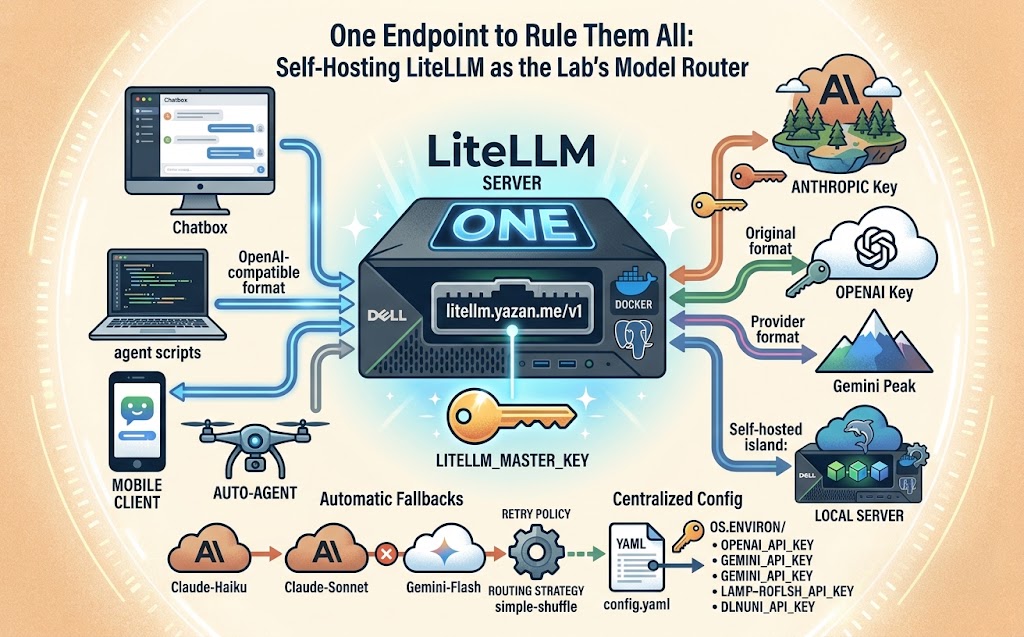
G'day! Welcome back. Between Claude, GPT, Gemini, and our own uncensored Dolphin model running on Hugging Face ZeroGPU, this lab has quietly ended up talking to four different AI providers with four different SDKs, four different key formats, and four different ways of falling over. Every script and agent that wanted a model had to know all of it.
LiteLLM fixes that by putting one OpenAI-compatible proxy in front of everything. Every provider — cloud or self-hosted — gets called the exact same way, from the exact same endpoint, with the exact same API shape. Let's crack into it.
Why Bother With a Router
The pitch is simple: point every tool in the lab — Chatbox, agent scripts, whatever's next — at one URL, and let LiteLLM sort out which upstream actually handles the request. That means:
-
One API key format everywhere, regardless of whether the request ends up at Anthropic, OpenAI, Google, or our own Hugging Face Space
-
Automatic fallbacks when a provider has a bad day, instead of a script dying on a 500
-
A single place to add or retire a model without touching every consumer of it
It's the same instinct behind fronting every service in this lab with Cloudflare Tunnels and Tailscale — normalize the boring, unreliable edges so nothing downstream has to think about them.
The Config
LiteLLM runs off one YAML file, and ours on the Dell server lists every model this lab actually calls — the self-hosted Dolphin model on Hugging Face, OpenAI's GPT line, the full Claude lineup, Gemini, and even a separate abliteration API for uncensored experiments:
model_list:
# Self-hosted
- model_name: Dolphin3.0-Mistral-24B
litellm_params:
model: openai/Dolphin3.0-Mistral-24B
api_base: https://hf.yazan.me/v1
api_key: os.environ/HF_API_KEY
# Anthropic
- model_name: claude-sonnet-5
litellm_params:
model: anthropic/claude-sonnet-5
api_key: os.environ/ANTHROPIC_API_KEY
# Google
- model_name: gemini-flash
litellm_params:
model: gemini/gemini-3.7-flash
api_key: os.environ/GEMINI_API_KEY
Notice the self-hosted Dolphin model is declared with the openai/ prefix, not a custom provider — because our Hugging Face Space proxy (the systemd service sitting behind hf.yazan.me) already speaks the OpenAI chat-completions format. LiteLLM doesn't care that the model underneath is a locally fine-tuned Mistral; if it quacks like an OpenAI endpoint, it slots into the same list as GPT and Claude with zero special-casing.
Fallbacks: The Part That Actually Earns Its Keep
The real payoff isn't the unified endpoint — plenty of tools speak multiple providers already. It's this bit:
litellm_settings:
drop_params: true
num_retries: 3
request_timeout: 600
fallbacks:
- claude-haiku-4-5: ["claude-sonnet-5", "gemini-flash"]
- claude-sonnet-5: ["claude-opus-5", "gpt-5.5"]
router_settings:
routing_strategy: simple-shuffle
allowed_fails: 3
cooldown_time: 30
retry_policy:
InternalServerErrorRetries: 3
RateLimitErrorRetries: 3
TimeoutErrorRetries: 2
Ask for claude-haiku-4-5 and hit a rate limit or an outage, and LiteLLM quietly retries against claude-sonnet-5, then gemini-flash, before ever surfacing an error back to whatever script asked. drop_params: true is the other quiet workhorse here — it strips any parameter a given provider doesn't understand instead of erroring out, which matters a lot when the same calling code targets wildly different APIs like Anthropic's and Gemini's.
Setting It Up
Step 1: Get the config and secrets in place. The YAML never holds a raw key — every api_key is an os.environ/ reference, resolved from an .env file (or systemd EnvironmentFile) at start, so the config itself is safe to keep in a synced folder without leaking credentials.
mkdir -p /opt/litellm && cd /opt/litellm
# config.yaml goes here
cat > .env <<'EOF'
LITELLM_MASTER_KEY=sk-...
ANTHROPIC_API_KEY=...
OPENAI_API_KEY=...
GEMINI_API_KEY=...
HF_API_KEY=...
EOF
Step 2: Run it. LiteLLM ships an official image, so it's one more container alongside Jellyfin, Immich, and the rest of the Dell server's compose sprawl:
docker run -d --name litellm --restart=always \n -p 4000:4000 \n --env-file .env \n -v $(pwd)/config.yaml:/app/config.yaml \n ghcr.io/berriai/litellm:main-stable \n --config /app/config.yaml
Step 3: Front it and lock it down. Same pattern as everything else here — cloudflared exposes it at litellm.yazan.me, and the general_settings.master_key becomes the one Bearer token every client in the lab authenticates with:
general_settings:
master_key: os.environ/LITELLM_MASTER_KEY
Step 4: Point clients at it. Anything that speaks the OpenAI SDK — Chatbox, LangChain scripts, custom agent code — just needs its base URL swapped to https://litellm.yazan.me/v1 and its key swapped to the master key. No per-provider SDKs, no per-provider error handling.
The Bonus Round: Search Tools
Newer LiteLLM builds let you register web search providers the same declarative way as models:
search_tools:
- search_tool_name: tavily-search
litellm_params:
search_provider: tavily
api_key: os.environ/TAVILY_API_KEY
timeout: 15
That means any model behind the proxy can be handed live web search as a tool without every calling script needing its own Tavily integration — one more thing centralized behind the router instead of scattered across the lab.
The Verdict
LiteLLM doesn't do anything a well-written wrapper script couldn't do badly, by hand, forever. What it actually buys is the boring stuff: one endpoint, one key format, automatic fallbacks when a provider hiccups, and one YAML file that describes the entire AI stack instead of that knowledge being smeared across a dozen scripts. For a lab already running its own fine-tuned model next to three commercial frontier providers, that's not a nice-to-have — it's what makes swapping any one of them out a one-line change instead of a rewrite.
Stand it up once, repoint everything at it, and never hardcode a provider SDK again. Cheers!
"If you've got any questions or need a hand wrangling your own setup, don't hesitate to reach out at [email protected] or connect with me via www.yazan.me. I'm always keen to help out!"