




- Email[email protected]
- Phone+962 797 166 177
- Birthday1982-09-25
- LocationAmman, Jordan
Mastering Room Presence: ESP32 Bluetooth Proxies & Bermuda BLE
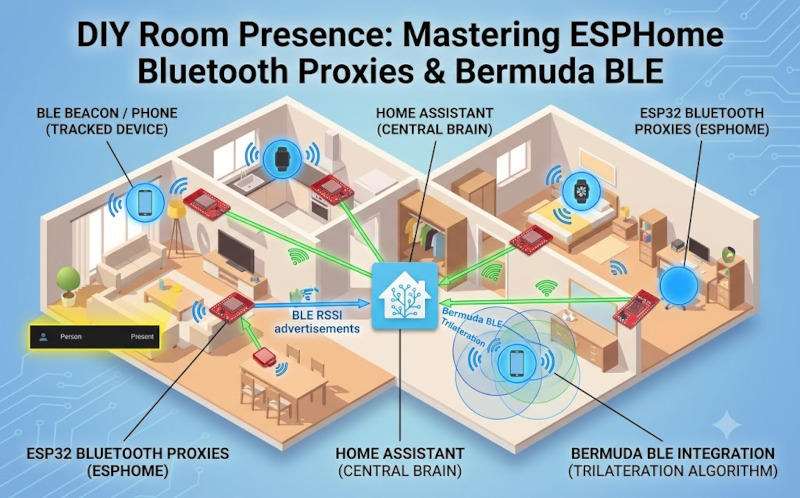
Room presence is the absolute holy grail of smart home automation, and combining ESPHome with the Bermuda BLE integration is a brilliant way to pull it off. Instead of relying on traditional motion sensors that leave you sitting in the dark the second you stop moving, Bermuda tracks your phone or BLE beacons to know exactly which room you're lounging in.
The real beauty of this setup is that you don't need to drop a fortune on proprietary gear. You just scatter a few cheap ESP32 boards around the house, flash them with ESPHome, and let them act as dedicated Bluetooth proxies. They sniff out Bluetooth signals and pass them straight to Home Assistant over your Wi-Fi network without breaking a sweat.
Here is a perfect example of a lean, mean Bluetooth proxy configuration for your ESP32. Notice how the esp32_ble_tracker is set up with specific scan parameters, while the bluetooth_proxy component is set to active. This is exactly what Home Assistant needs to start gathering those BLE advertisements:
YAML
esphome:
name: "k-esp32-bluetooth-proxy"
friendly_name: K ESP32 Bluetooth Proxy
name_add_mac_suffix: false
esp32:
board: esp32dev
framework:
type: arduino
logger:
level: WARN
api:
encryption:
key: "l26dQVCTporhB3EJzfnHiWBmK3oIc8H2w7HYtwTU888="
ota:
- platform: esphome
password: "941cb3ec19f0fcff15d740ab17c3ae36"
wifi:
networks:
- ssid: !secret wifi_ssid
password: !secret wifi_password
power_save_mode: NONE
reboot_timeout: 0s
ap:
ssid: "K ESP32 Bluetooth Proxy"
password: "2vsPcQNqWFt9"
mqtt:
broker: !secret mqtt
username: !secret mqtt_user
password: !secret mqtt_password
sensor:
- platform: wifi_signal
name: "WiFi Signal"
id: wifi_rssi_sensor
update_interval: 60s
# The core proxy logic
esp32_ble_tracker:
scan_parameters:
active: false
interval: 320ms
window: 300ms
bluetooth_proxy:
active: true
Once you've got your ESP32s flashed, plugged in, and assigned to their respective Rooms (or Areas) in Home Assistant, it's time to bring in the brains of the operation: Bermuda BLE Trilateration. Bermuda looks at the signal strength (RSSI) from all your proxies and calculates exactly which room your tracked device is closest to.
Getting Bermuda installed is an absolute doddle. Just follow these quick steps:
-
Open HACS (Home Assistant Community Store) in your Home Assistant dashboard.
-
Search for "Bermuda BLE Trilateration" in the Integrations section and hit download.
-
Restart your Home Assistant server so the new integration loads up.
-
Head over to Settings > Devices & Services, click Add Integration, and search for Bermuda.
-
Once added, click Configure on the Bermuda integration to select which Bluetooth devices (like your phone's BLE transmitter, smartwatches, or beacon tags) you want to track.
It works like a charm once you get it dialled in. You can link those newly created Bermuda device trackers straight to your "Person" entities in HA for seamless, rock-solid automations. Enjoy the build, Yaz!
"If you've got any questions or need a hand wrangling your own setup, don't hesitate to reach out at [email protected] or connect with me via www.yazan.me. I'm always keen to help out!"