




- Email[email protected]
- Phone+962 797 166 177
- Birthday1982-09-25
- LocationAmman, Jordan
Free GPU, Real Results Using Google Colab's T4 as Your Home Lab's AI Training Sidekick
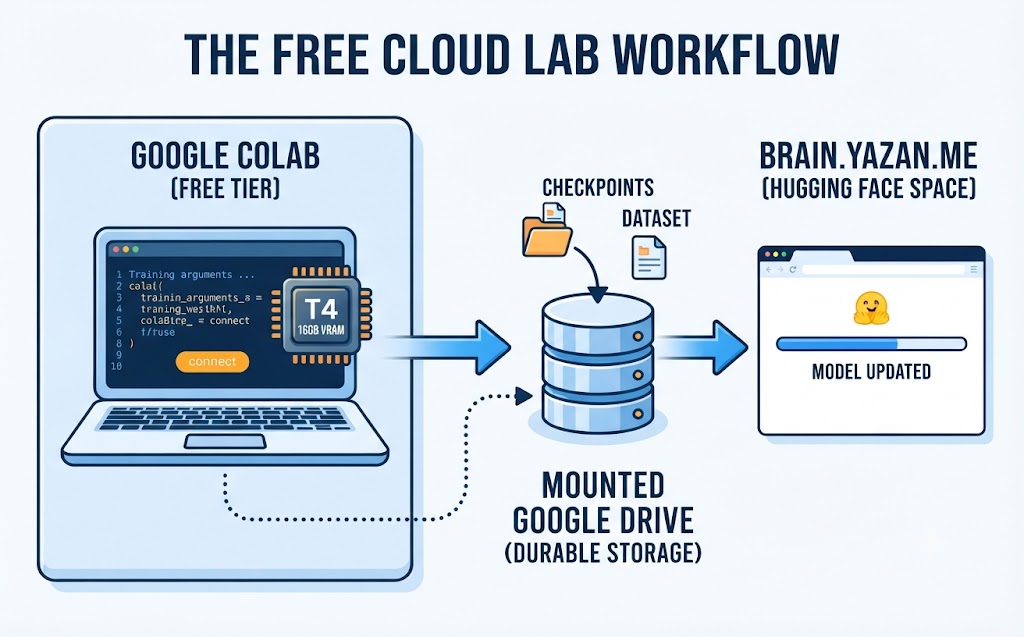
Welcome back. Three posts back now — abliteration, LoRA fine-tuning, and finally deploying the result to Hugging Face's ZeroGPU — I kept mentioning the same detail almost in passing: all of the actual training happened on a free Colab GPU. None of it needed rented compute, a local graphics card, or a cloud bill. It's about time that detail got its own post, because the workflow around it is arguably the more useful thing to steal than any single experiment.
None of my home lab hardware has a real GPU in it. The Dell Vostro server is a champion at Docker containers, Frigate, and a dozen other self-hosted services, but its integrated graphics wouldn't get through a single training epoch before I lost patience. Google Colab's free tier hands you a T4 with 16GB of VRAM, for nothing, whenever one happens to be available. The catch is that "whenever one happens to be available" is doing a lot of work in that sentence, and the workflow only holds together if you plan around it rather than against it.
Picking the Right Runtime
First thing in any fresh notebook: Runtime -> Change runtime type -> T4 GPU. It's easy to forget and burn through several cells on a CPU runtime before wondering why a training step that should take seconds is taking minutes. Free tier sessions are capped at roughly 12 hours, disconnect after a stretch of inactivity, and during busy periods you'll sometimes get queued for a GPU instead of handed one immediately. None of that is a dealbreaker, but it does mean the whole notebook needs to be written assuming the session can vanish at any moment, not just at the end.
Mounting Drive So Nothing Gets Lost on Disconnect
Colab's local disk disappears the moment the session ends, which is a nasty surprise the first time it happens mid-training. The fix is to mount Google Drive at the top of every notebook and treat it as the only durable storage that exists.
python
from google.colab import drive
drive.mount('/content/drive')
WORKDIR = '/content/drive/MyDrive/training-runs/qwen-lora'
Datasets get staged there before training starts, and — more importantly — checkpoints get written there during training, not just at the end.
Checkpointing Like the Session Will Die (Because It Will)
This is the habit that actually saves you. Early on I ran a training loop that only saved the adapter weights after the final epoch completed, and Colab reaped the session about twenty minutes from the finish line for sitting idle in the background tab. All of it, gone, with nothing to show. Since then, every run saves to Drive on a fixed step interval, not just at completion.
python
training_args = TrainingArguments(
output_dir=f'{WORKDIR}/checkpoints',
save_strategy='steps',
save_steps=25,
save_total_limit=3,
per_device_train_batch_size=4,
gradient_accumulation_steps=4,
)
save_total_limit keeps Drive from filling up with every intermediate checkpoint, and because the checkpoints live on Drive rather than Colab's local disk, a dropped session just means reconnecting, remounting Drive, and resuming from the last saved step instead of starting over.
The Handoff: From Notebook to brain.yazan.me
Training is only half the workflow. Once a run finishes, the adapter weights need to leave Colab entirely and land somewhere that can actually serve inference around the clock, which is the Hugging Face Space behind brain.yazan.me. The huggingface_hub library handles that push directly from the notebook, no manual download-and-reupload required.
python
from huggingface_hub import HfApi
api = HfApi()
api.upload_folder(
folder_path=f'{WORKDIR}/checkpoints/final',
repo_id='ydaradkeh/qwen3-32b-lab-brain',
repo_type='model',
)
From there, the ZeroGPU Space picks up the new weights on its next build, and the model behind brain.yazan.me updates without ever touching a local machine. The free Colab GPU only ever has to do the training; the always-on serving lives entirely somewhere else, which is exactly the division of labour that makes the free tier's session limits a non-issue in practice.
Honest Fine Print
The free tier is genuinely free, and it is genuinely not guaranteed. GPU availability varies by time of day, sessions get disconnected for sitting idle, and 16GB of VRAM on a T4 puts a real ceiling on model size before you're reaching for quantisation or LoRA specifically to fit under it, rather than as an optimisation choice. This is a training and experimentation workflow, not a production one. It's a fantastic way to learn the mechanics of fine-tuning or run an occasional training pass without paying for compute you'd otherwise use once a month, but nothing here is meant to be hosting live traffic. That job belongs to ZeroGPU, which is precisely why the two live in different posts.
The Verdict
The pattern that actually matters here is small: train on Colab treating every session as disposable, checkpoint to Drive constantly, and hand the finished weights off to somewhere built to stay up. Once that pattern is in place, the free GPU stops being a limitation you're working around and just becomes another tool in the lab, same as the Raspberry Pis and the Docker containers.
If you've got any questions or want a hand setting up your own Colab training workflow, don't hesitate to reach out at [email protected] or connect with me via www.yazan.me. I'm always keen to help out!
"If you've got any questions or need a hand wrangling your own setup, don't hesitate to reach out at [email protected] or connect with me via www.yazan.me. I'm always keen to help out!"