




- Email[email protected]
- Phone+962 797 166 177
- Birthday1982-09-25
- LocationAmman, Jordan
Ditching the Streaming Giants: Self-Hosting Your Own Netflix with Jellyfin & Docker
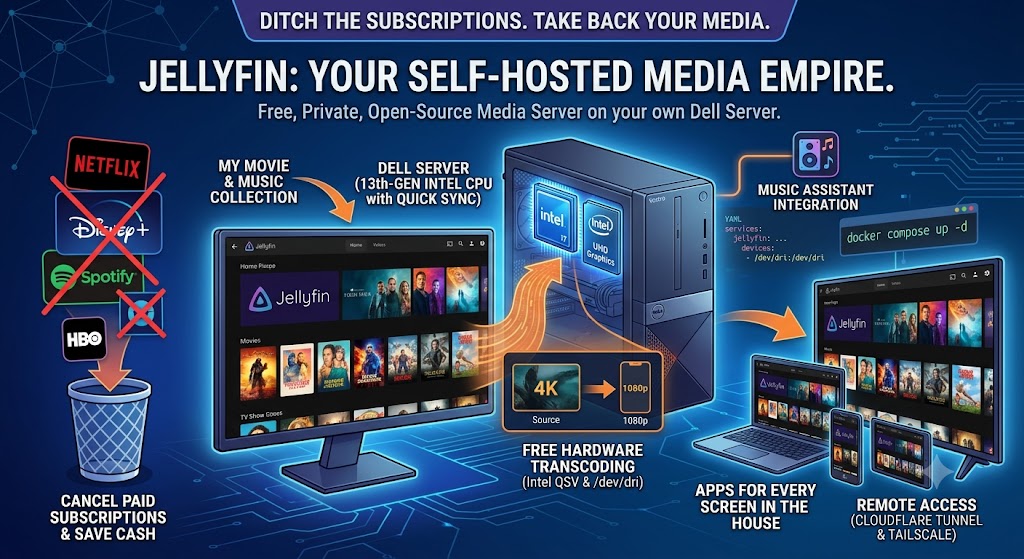
G'day mates! Welcome back to the lab. We've already given Big Tech the boot once when we deployed our own Nextcloud stack on the trusty Dell server. Today, we're going after the next subscription on the chopping block: the streaming services.
Between the price hikes, the password-sharing crackdowns, and your favourite shows vanishing overnight, streaming has lost its shine. Meanwhile, that Dell Vostro sitting in the corner running our LAMP stack, Frigate, and Traccar still has plenty of grunt left in it.
Enter Jellyfin: a completely free, open-source media server that turns your own movie and music collection into a slick, Netflix-style experience — with apps for every screen in the house. Let's crack into it!
Why Jellyfin Over Plex?
The obvious question first. Plex is the big name in this space, but it wants an account on their servers, pushes its own streaming content into your library, and locks hardware transcoding behind a paid pass.
Jellyfin is the people's champion: no accounts on anyone else's servers, no telemetry, no premium tier, no ads. Every single feature is free, and your viewing habits stay in your house where they belong. For a home lab that's proudly self-hosted, it's not really a contest.
Spinning It Up in Docker
Step 1: The Compose File. As always, we're keeping the host squeaky clean and running everything in a container. Here's the compose config:
YAML
services:
jellyfin:
container_name: jellyfin
image: jellyfin/jellyfin:latest
restart: unless-stopped
network_mode: host
volumes:
- /path/to/config:/config
- /path/to/cache:/cache
- /path/to/your/media:/media:ro
devices:
- /dev/dri:/dev/dri
Note that devices line — it's the secret sauce we'll get to in a minute. Mount your media read-only (:ro) so the container can't touch your precious collection.
Step 2: Launch It. You know the drill by now:
Bash
docker compose up -d
Step 3: The Setup Wizard. Browse to your server's IP on port 8096, run through the setup wizard, point it at your media folders, and watch Jellyfin fetch artwork, descriptions, and metadata for your entire library automatically. It's a genuinely satisfying moment.
The Secret Sauce: Free Hardware Transcoding
Here's where our Dell server earns its keep. Its 13th-gen Intel i7 comes with UHD graphics and Intel Quick Sync — dedicated silicon for encoding and decoding video.
In the Jellyfin dashboard, head to Playback settings and enable Intel QSV hardware acceleration. That /dev/dri device we passed into the container gives Jellyfin direct access to the GPU.
The result? The server can transcode 4K video down to whatever your phone or TV can handle on the fly, barely touching the CPU. This is the exact feature Plex charges for — Jellyfin hands it to you for free.
Watching From Anywhere
Jellyfin has native apps for Android, iOS, Android TV, and just about every smart TV platform, plus a cracking web interface.
At home, everything streams at full quality over the LAN. For remote access, I've put Jellyfin behind a Cloudflare Tunnel — the same zero-open-ports trick from our previous posts. And for the heavy lifting, like streaming a full-fat movie to the laptop while travelling, Tailscale gives you a direct encrypted pipe to the server without any middleman.
Bonus Round: Remember our Music Assistant setup from last time? Jellyfin doubles as a music provider for it. Point Music Assistant at your Jellyfin server, and your entire music collection is suddenly available on every speaker in the house. The lab, as always, is one big happy family.
The Verdict
If you've got a spare machine with an Intel chip and a media collection gathering digital dust, Jellyfin is one of the most rewarding weekend projects in the self-hosted world. It's free, private, has zero subscriptions, and honestly, watching your own library through a polished interface you host yourself never gets old.
Spin it up, rip your collection, and cancel a subscription or two. Your wallet will thank you. Cheers!
"If you've got any questions or need a hand wrangling your own setup, don't hesitate to reach out at [email protected] or connect with me via www.yazan.me. I'm always keen to help out!"