




- Email[email protected]
- Phone+962 797 166 177
- Birthday1982-09-25
- LocationAmman, Jordan
Beyond Pi-hole: Network-Wide DNS Filtering on the Router with Control D
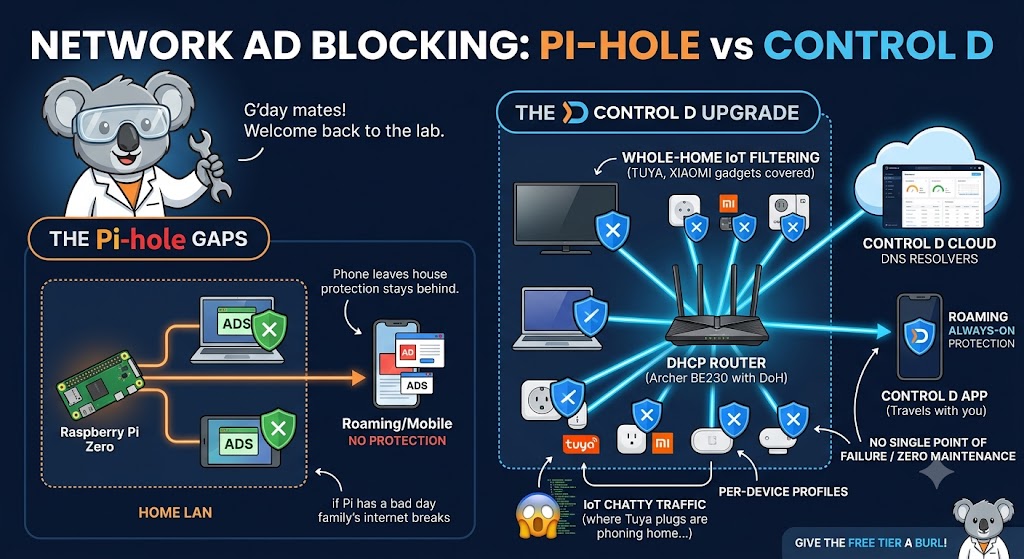
G'day mates! Welcome back to the lab. A while back, we set up Pi-hole on a Raspberry Pi Zero and enjoyed the bliss of network-wide ad blocking. That little Pi has served us well — but the setup had a couple of gaps that kept nagging at me.
Gap one: the moment your phone leaves the house, the protection stays behind. Gap two: it's another service to feed and water, and if the Pi has a bad day, the whole family's internet 'breaks' until you fix DNS.
Today we're looking at Control D — a cloud-based DNS filtering service from the folks behind Windscribe — and how I've ended up running it right on the router. Let's crack into it!
Pi-hole vs Control D: An Honest Comparison
Let's be fair dinkum about this — Pi-hole is still brilliant. It's free, fully local, and gives you complete control and gorgeous query logs. Nothing leaves your network, and for a self-hosting purist that matters.
But Control D plays a different game. Because filtering happens at their DNS resolvers instead of on your hardware, you get:
Protection that travels: Install the app on your phone or laptop, and the same filtering rules follow you to work, the coffee shop, and hotel Wi-Fi.
Nothing to maintain: No Pi to update, no blocklists to curate, no single point of failure sitting on your shelf.
Per-device profiles: Different rules for the kids' devices, the IoT junk, and your own gear, managed from one dashboard.
The trade-off is trust: your DNS queries go to Control D instead of staying home. That's a real cost, and whether it's worth paying depends on your threat model and your patience for maintenance.
The Router-Level Play
Here's the move that convinced me: putting Control D directly on the DHCP router — in our case the Archer BE230 that runs the main 5G network.
Modern TP-Link firmware supports custom DNS-over-HTTPS upstreams, so the router itself resolves every query through your Control D endpoint. Every device that joins the network is instantly covered: the phones, the laptops, and critically, the two Huawei bridges carrying the 2.4GHz IoT networks.
That last bit is the killer feature for a smart home. Those dozens of Tuya, Xiaomi, Eufy, and Tapo gadgets can't run a DNS app — but they all get filtered anyway, and the Control D dashboard shows you exactly which chatty IoT device is phoning home to where. Prepare to be horrified.
Setting It Up
Step 1: Build Your Profile. Create your endpoint in the Control D dashboard first, pick your filters (ads, trackers, malware — plus optional categories like social or gambling), then wire it in.
Step 2: Point the Router at It. In the router's DHCP/DNS settings, replace the ISP's DNS with your unique Control D resolver address. Every device on the network is now covered without touching a single one of them.
Step 3: Cover the Roaming Devices. For Linux boxes like our Pis and the Dell server, Control D ships a neat one-line installer for its ctrld daemon:
Bash
sh -c "$(curl -sL https://api.controld.com/dl)"
And on phones and laptops, the Control D app (or a plain DoH profile) keeps the same rules active when you're out and about — the thing Pi-hole fundamentally can't do.
So... Which One Should You Run?
Honestly? I run both philosophies at once, and I reckon that's the right answer. Control D on the router and roaming devices for zero-maintenance, everywhere coverage. And the local-first instinct Pi-hole taught us lives on — if you want your query logs at home, nothing stops you pointing Pi-hole's upstream at Control D and getting the best of both worlds.
The Verdict
Pi-hole made network-wide ad blocking a home lab rite of passage. Control D grows the same idea up: filtering that covers the un-appable IoT swarm at the router, follows your pocket devices out the front door, and never needs a software update from you.
Give the free tier a burl, watch what your smart plugs are whispering to the internet, and thank me later. Cheers!
"If you've got any questions or need a hand wrangling your own setup, don't hesitate to reach out at [email protected] or connect with me via www.yazan.me. I'm always keen to help out!"