




- Email[email protected]
- Phone+962 797 166 177
- Birthday1982-09-25
- LocationAmman, Jordan
Beyond Dashboards: Visualizing IoT Telemetry with a Self-Hosted ThingsBoard
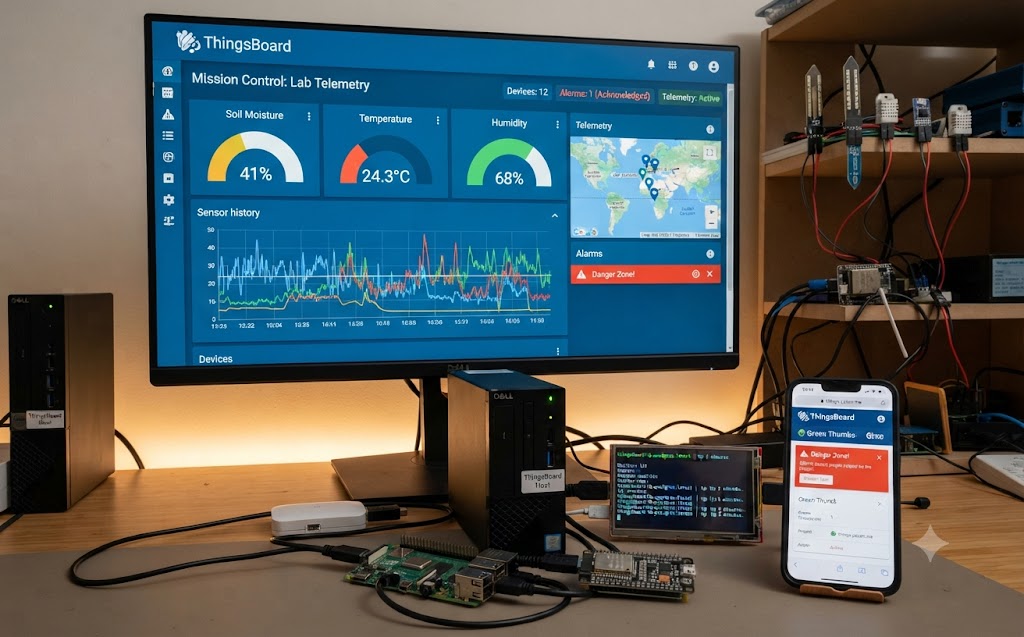
G'day mates! Welcome back to the lab. Home Assistant has been the brain of this operation for a long time now — it flips the lights, watches the cameras, and babysits phone batteries. But there's one job it's never been brilliant at: showing you your data. Sensor history in Home Assistant is functional, sure, but it's a filing cabinet, not a mission control.
Meanwhile, the lab generates telemetry all day long. The soil moisture nodes from our Green Thumbs project, the temperature and humidity sensors on every ESP32 room node, the Zigbee gear chattering away through the MQTT broker — all of it deserves better than a cramped history graph.
Enter ThingsBoard: a free, open-source IoT platform built for exactly this. Proper time-series dashboards, device management, a rule engine, and alarms — all self-hosted on our trusty Dell server. Let's crack into it!
Why ThingsBoard and Not Just More Home Assistant?
Fair question. You could bolt InfluxDB and Grafana onto Home Assistant and get lovely graphs — plenty of people do. But ThingsBoard is a different animal: it's a platform designed around devices and telemetry from the ground up.
Every sensor becomes a managed device with its own credentials and history. Dashboards are built from drag-and-drop widgets — gauges, time-series charts, maps, control knobs — and can be shared as read-only public links without exposing anything else. And the rule engine lets you process, filter, and alarm on data as it arrives, no YAML required.
Home Assistant stays the brain for control and automation. ThingsBoard becomes the analytics department. The Community Edition is completely free and open source, which around here is the only kind of software that gets an invite.
Spinning It Up in Docker
The Dell Vostro is already earning its keep running the LAMP stack, Frigate, Traccar, and Jellyfin, but that 13th-gen i7 still has grunt to spare. As always, we keep the host clean and run everything in a container. ThingsBoard ships a convenient image with PostgreSQL baked in:
YAML
services:
thingsboard:
container_name: thingsboard
image: thingsboard/tb-postgres:latest
restart: unless-stopped
ports:
- "8080:9090"
- "1884:1883"
volumes:
- ./data:/data
- ./logs:/var/log/thingsboard
Two things to note. First, ThingsBoard runs its own MQTT listener for device traffic — since our Mosquitto broker already owns port 1883 territory on the network, the container's listener gets mapped to 1884 to keep the peace. Second, give it a minute on first boot: it's initialising a whole database in there.
Bash
docker compose up -d
Browse to port 8080, log in with the default tenant account, change the password immediately, and you're looking at your new mission control.
Getting the Data Flowing
In ThingsBoard, you create a device and it hands you an access token. Anything that can speak MQTT can then push telemetry to the platform with that token — one topic, JSON payload, done:
Bash
mosquitto_pub -h server.local -p 1884 \
-u "$ACCESS_TOKEN" \
-t "v1/devices/me/telemetry" \
-m '{"soil_moisture": 41, "temperature": 24.3}'
For the ESP32 fleet, that's a tiny tweak in ESPHome or the Arduino sketch. But here's the lazier trick for everything already in Home Assistant: one automation with an mqtt.publish action forwards any entity's state to ThingsBoard the moment it changes. The sensors don't even know they're being syndicated — Home Assistant plays courier, and both platforms stay happy.
Out Into the World: things.yazan.me
You know this move by now. A Cloudflare Tunnel entry points things.yazan.me at the container's web port, no ports opened on the router, with Cloudflare Access standing guard in front — the same zero-trust setup from our Locking Down the Lab post. Admin access from anywhere, attack surface of nothing.
Building a Dashboard Worth the Name
This is where ThingsBoard shows off. In about twenty minutes I had a garden dashboard with a time-series chart of every soil moisture node, colour-coded gauges showing which plants are living their best life, and a map widget I'll admit I added purely because it looks cool.
Then the rule engine gets its moment: a simple chain watches the soil moisture telemetry and raises an alarm when a plant crosses into the danger zone. Alarms show up right on the dashboard with acknowledge buttons — and if you want them pushed to your phone, the rule engine happily fires off a notification, much like our Telegram-over-MQTT fleet alerts from a previous post.
The killer feature for sharing: mark a dashboard public and send the link. The family can check whether the plants need water without touching Home Assistant, an account, or anything they could accidentally break. Read-only glory.
The Verdict
ThingsBoard won't replace Home Assistant, and it isn't trying to. What it adds is the layer the lab was quietly missing: a proper window into all that data the sensors have been dutifully producing for years. It's one container on hardware you already own, it speaks the MQTT the lab already speaks, and the dashboards genuinely look the business.
If your sensor history is gathering dust in a database nobody looks at, give it the mission-control treatment. Your data has stories to tell, mate. Cheers!
"If you've got any questions or need a hand wrangling your own setup, don't hesitate to reach out at [email protected] or connect with me via www.yazan.me. I'm always keen to help out!"